Installing Microsoft 365 on Personal Computers and Devices-Students

Contents

    Gettysburg College students can download up to 5 copies of Microsoft Office for use on personally owned computers. The Office suite includes Word, PowerPoint, Excel, and other Microsoft applications.

    Do not install copies of Office 365 apps on any college-owned computers. If you need to upgrade the version of Office on a college-owned computer, please contact G-Tech.

    1. Go to https://www.office.com
    2. Click the Sign in button.
    3. Enter your Gettysburg Email address and click the Next button.
    Microsoft 365 Sign In-email field
    1. If prompted, choose the Work or school account option.
    Microsoft 365-Work, School, or Personal account selection window
    1. Enter your Gettysburg password and click the Sign in button.
    2. In the Navigation bar either:
    • Click the Apps and More button and select More Apps.
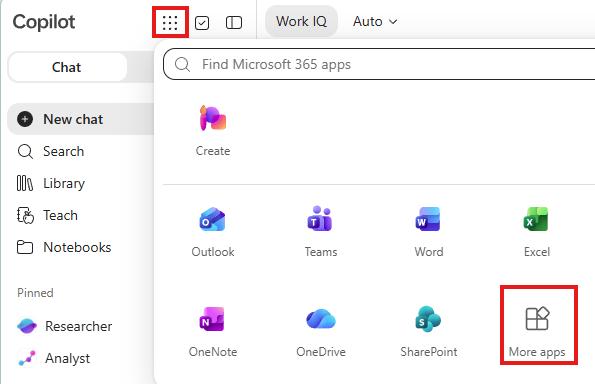
    Microsoft 365 Apps button with More apps option highlighted
    • or click the Apps button and select the All apps option.
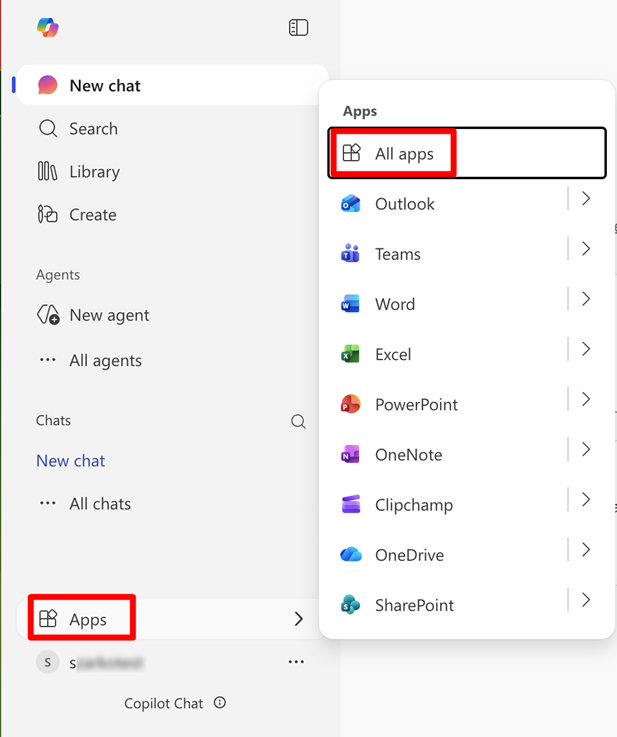
    Microsoft 365 Navigation bar with Apps and All Apps menus circled
    1. Click the Install apps button and choose the Microsoft 365 apps option.
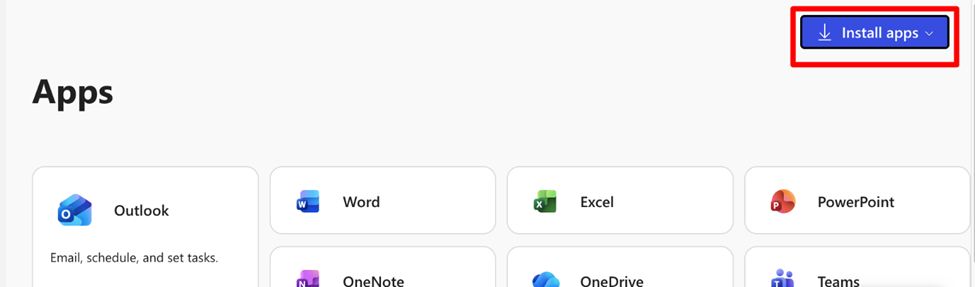
    Microsoft 365 All Apps screen with Install Apps button circled
    Updated on September 9, 2026
    Was this article helpful?
    css.php